Un-sharding a ClickHouse Distributed Table into ReplicatedMergeTree
A step-by-step walkthrough with dummy data
Why un-shard
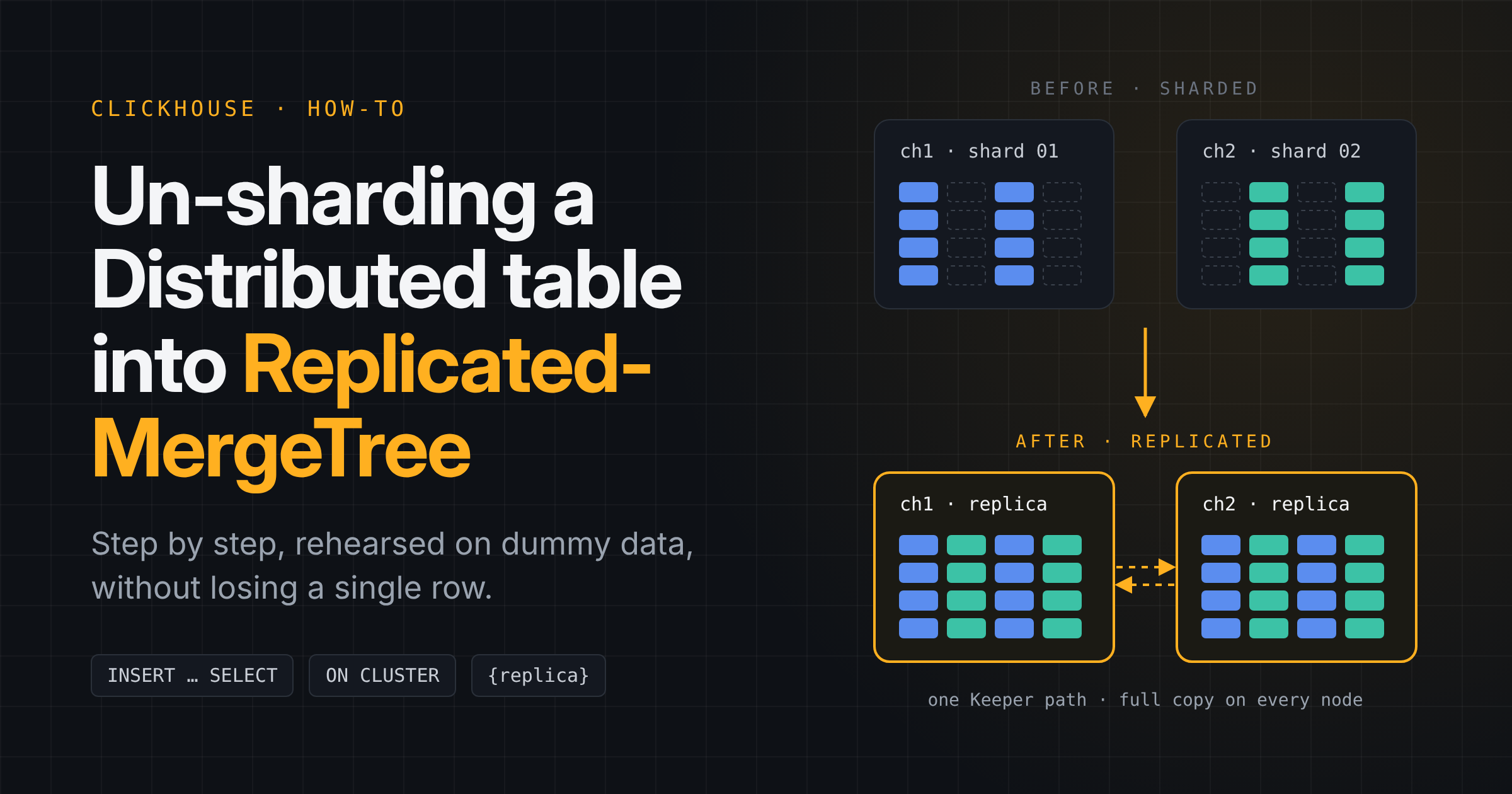
Un-sharding means reading every row out of a Distributed table and writing it into one ReplicatedMergeTree table that holds the full data set on every node. It is the right move when a table is small enough for one server and you want simpler queries, no sharding key, and a full copy on each replica for high availability.
A sharded table in ClickHouse is two objects. Each node has a local *MergeTree table that stores only its own slice of the rows, and a Distributed table on top that fans queries and inserts out to those local tables. Neither of them is replicated: if a node goes down, its slice is gone until it comes back.
After un-sharding, there is one ReplicatedMergeTree table with the same ZooKeeper path on every node. ClickHouse Keeper (or ZooKeeper) keeps the copies in sync, so any node can answer any query on its own.
BEFORE: sharded                         AFTER: un-sharded

      events_distributed                     one shared Keeper path
      (Distributed, no data)                 (one replication group)
         /            \                        /             \
 ch1: events_local  ch2: events_local   ch1: events_replicated  ch2: events_replicated
 ~half the rows     ~half the rows      all 100,000 rows        all 100,000 rows
This post walks through the whole process on a two-node demo cluster with 100,000 rows of dummy data, so you can rehearse it before touching production.
Set up the demo with dummy data
The demo uses two nodes, ch1 and ch2, in a cluster called demo_cluster with two shards of one replica each. Each node defines two macros that the DDL below relies on:
| Node | {shard} | {replica} |
|---|---|---|
| ch1 | 01 | ch1 |
| ch2 | 02 | ch2 |
First, create the database and the local table that stores each shard's slice:
CREATE DATABASE IF NOT EXISTS demo ON CLUSTER demo_cluster;

CREATE TABLE demo.events_local ON CLUSTER demo_cluster
(
    `event_id`   UUID DEFAULT generateUUIDv4(),
    `user_id`    String,
    `event_type` String,
    `created_on` DateTime DEFAULT now(),
    `payload`    String
)
ENGINE = MergeTree
ORDER BY created_on;
Then the Distributed table on top of it, sharded by user_id:
CREATE TABLE demo.events_distributed ON CLUSTER demo_cluster
AS demo.events_local
ENGINE = Distributed('demo_cluster', 'demo', 'events_local', cityHash64(user_id));
Now generate 100,000 dummy rows with numbers() and insert them through the Distributed table:
INSERT INTO demo.events_distributed (user_id, event_type, created_on, payload)
SELECT
    concat('user_', toString(number % 500))                      AS user_id,
    ['login', 'view', 'comment', 'logout'][number % 4 + 1]      AS event_type,
    now() - toIntervalSecond(number * 30)                        AS created_on,
    concat('dummy payload #', toString(number))                  AS payload
FROM numbers(100000);

SYSTEM FLUSH DISTRIBUTED demo.events_distributed;
SYSTEM FLUSH DISTRIBUTED pushes any rows still queued by the Distributed table into the local tables, so the counts below are final. Check how the rows were split:
SELECT hostName() AS node, count() AS rows
FROM clusterAllReplicas('demo_cluster', demo.events_local)
GROUP BY node
ORDER BY node;

SELECT count() FROM demo.events_distributed;  -- 100000
Each node holds roughly half of the rows, and only the Distributed table sees all 100,000. That is the starting point.
Steps 1 and 2: freeze the source table
Stop every writer before you copy anything. Rows that reach the old Distributed table after the copy starts will not be in the new table, and nothing will warn you about them. In practice this means pausing the application job, consumer or ETL that inserts into demo.events_distributed.
With writes stopped, flush the Distributed queue once more and make sure no mutation or merge is still running on the local tables:
SYSTEM FLUSH DISTRIBUTED demo.events_distributed;

-- Unfinished ALTER ... UPDATE / DELETE: must return no rows
SELECT hostName(), mutation_id, command, parts_to_do
FROM clusterAllReplicas('demo_cluster', system.mutations)
WHERE database = 'demo' AND table = 'events_local' AND NOT is_done;

-- Running merges: should return no rows
SELECT hostName(), elapsed, progress
FROM clusterAllReplicas('demo_cluster', system.merges)
WHERE database = 'demo' AND table = 'events_local';
The mutation check matters most. A half-applied ALTER TABLE ... DELETE would copy rows that were meant to be gone. A running merge does not lose data, but waiting for it keeps the copy quiet and the counts stable.
Finally, record the numbers you will verify against later:
SELECT
    count()                                                                 AS rows,
    sum(cityHash64(event_id, user_id, event_type, created_on, payload))    AS checksum
FROM demo.events_distributed;
Step 3: create the ReplicatedMergeTree table
Create the new table on every node with the same columns as the local table. The ZooKeeper path must be identical on all nodes and must not contain {shard}; only the replica name differs, through the {replica} macro.
CREATE TABLE demo.events_replicated ON CLUSTER demo_cluster
(
    `event_id`   UUID DEFAULT generateUUIDv4(),
    `user_id`    String,
    `event_type` String,
    `created_on` DateTime DEFAULT now(),
    `payload`    String
)
ENGINE = ReplicatedMergeTree('/clickhouse/tables/unshard/demo/events_replicated', '{replica}')
ORDER BY created_on;
The path is what turns the two tables into one. Every replica that registers under /clickhouse/tables/unshard/demo/events_replicated joins the same replication group, so a row inserted on ch1 is fetched by ch2 and the other way round. If you kept {shard} in the path, ch1 and ch2 would land in two separate groups and you would still have two half tables.
The column list must match the source. The ORDER BY and PARTITION BY keys can change, which makes un-sharding a good moment to fix a sorting key that never fit the queries.
Check that the table exists on both nodes and that both replicas see each other:
SELECT hostName(), replica_name, total_replicas, active_replicas, is_readonly
FROM clusterAllReplicas('demo_cluster', system.replicas)
WHERE database = 'demo' AND table = 'events_replicated';
Both rows should show total_replicas = 2, active_replicas = 2 and is_readonly = 0.
Step 4: copy the data with INSERT ... SELECT
Run the copy once, on one node only. Connect to ch1 and read from the Distributed table, which pulls the slices from both shards:
-- Run on ch1 only
INSERT INTO demo.events_replicated
SELECT * FROM demo.events_distributed;
The new table on ch1 receives all 100,000 rows. ch2 then fetches the same parts through replication, so you never insert on the second node. Running the statement on both nodes would write every row twice, and a plain ReplicatedMergeTree does not remove the duplicates.
For a large table the copy can take a while and use a lot of memory. Two settings help:
INSERT INTO demo.events_replicated
SELECT * FROM demo.events_distributed
SETTINGS max_insert_block_size = 100000, max_memory_usage = 10000000000;
If the table is too big for one statement, copy it in slices by partition or by date range (for example one WHERE toYYYYMM(created_on) = 202601 per run) and keep a list of which slices are done. If a run fails halfway, truncate the new table and start that slice again rather than guessing which rows landed.
Wait until the second replica has caught up before you verify:
-- Run on ch2
SYSTEM SYNC REPLICA demo.events_replicated;
Verify the result
The migration is correct when every node holds the full row count and the same checksum you recorded in step 2. Run the same query against the new table on each node:
SELECT
    hostName()                                                              AS node,
    count()                                                                 AS rows,
    sum(cityHash64(event_id, user_id, event_type, created_on, payload))    AS checksum
FROM clusterAllReplicas('demo_cluster', demo.events_replicated)
GROUP BY node
ORDER BY node;
Expected result for the demo:
| Node | rows | checksum |
|---|---|---|
| ch1 | 100000 | same as step 2 |
| ch2 | 100000 | same as step 2 |
Both nodes now show 100,000 rows, where the old local tables showed about 50,000 each. The checksum is a sum of row hashes, so it does not depend on row order and catches a changed value as well as a missing row.
Then check replication health:
SELECT hostName(), is_readonly, absolute_delay, queue_size, active_replicas, total_replicas
FROM clusterAllReplicas('demo_cluster', system.replicas)
WHERE database = 'demo' AND table = 'events_replicated';
You want is_readonly = 0, absolute_delay = 0, queue_size = 0 and active_replicas = total_replicas on every node. As a last test, insert one row on ch2 and confirm it appears on ch1 a moment later.
Cut over and clean up
Point the application at demo.events_replicated and restart the writers. Every node now has the full data set, so readers can query the table directly on any node; no Distributed table is needed for reads.
If the application must keep a single entry point with load balancing, put a new Distributed table over a one-shard cluster (for example cluster_1shard_replicated, listing ch1 and ch2 as replicas of one shard with internal_replication = true):
CREATE TABLE demo.events ON CLUSTER demo_cluster
AS demo.events_replicated
ENGINE = Distributed('cluster_1shard_replicated', 'demo', 'events_replicated', rand());
internal_replication = true is required here. Without it, the Distributed table writes each row to every replica itself, and replication then copies it again.
Keep the old objects until the new table has run in production for a while. They cost only disk space and are your rollback:
-- Rollback: point the application back at demo.events_distributed.

-- Cleanup, only after you are sure:
DROP TABLE demo.events_distributed ON CLUSTER demo_cluster SYNC;
DROP TABLE demo.events_local       ON CLUSTER demo_cluster SYNC;
Drop the Distributed table first. It holds no data itself, but dropping the local table first would leave it pointing at nothing.
Pitfalls and checklist
Most failed un-sharding runs come from one of four mistakes:
| Mistake | What happens | Fix |
|---|---|---|
{shard} left in the ZooKeeper path | Each node gets its own replication group and keeps only half the data | One fixed path for all nodes, only {replica} varies |
INSERT ... SELECT run on every node | Every row is stored once per node | Insert on one node, let replication copy it |
| Writers not stopped | Rows written during the copy exist only in the old tables | Pause writers, flush the Distributed queue, then copy |
| Old tables dropped right away | No way back if a count or query is wrong | Keep them until the new table has proven itself |
Also check first whether the table is already replicated. Run SHOW CREATE TABLE on the local table behind the Distributed table: if its engine is already ReplicatedMergeTree with a shard-free path, there is nothing to migrate.
Run-book for production:
- Rehearse the whole flow on a test cluster with dummy data
-
SHOW CREATE TABLEon the Distributed and local tables - Stop writers and run
SYSTEM FLUSH DISTRIBUTED - No open mutations, no running merges
- Record
count()and the checksum - Create the
ReplicatedMergeTreetableON CLUSTERwith a shard-free path -
INSERT ... SELECTfrom the Distributed table, on one node -
SYSTEM SYNC REPLICAon the other nodes - Same count and checksum on every node, replicas healthy
- Point the application at the new table and restart writers
- Drop the old tables only after a safe period